Plan the lesson.Teach the class.Check the papers.Record the grades.
Learn at your own pace, at your own space.
Seedara does the paperwork around your teaching, from the lesson plan to the class record, so you have more time for your students. For one teacher, or the whole school.
Seedara LMS is a one-time payment, with the Planner and Exam Kit included. The Planner or the Exam Kit on its own: from ₱349 a year.
Not sure yet? . No payment needed.
script.google.com/macros/s/…/exec
Good morning, Teacher!Tuesday · 7:42 AM
YOUR SUBJECTS + New lesson
Gen. Biology 112 lessons
Earth and Life Science9 lessons
Physical Science7 lessons
LATEST POSTS
Lesson 3: Cell Structure Published
Quiz 2: The Cell Theory Due Friday
PT 1: Model of a Cell Due Oct 20
Lesson 2: Cell Theory Oct 6
Quiz 2: The Cell Theory Results
TESLA · 10 items · results come in as students finish
AQUINO, Ana9/10
BAUTISTA, Ben8/10
CRUZ, Carla10/10
DIAZ, Dan7/10
ESTRADA, Ella9/10
FLORES, Gio6/10
Average 8.26 of 38 done
Class Record ✓ Quiz 2 and the exam, recorded for you
TESLA · General Biology 1 · Term 1
LEARNER
WW1
QZ2
PT1
QE
GRADE
AQUINO, Ana
8
9
46
36
91
BAUTISTA, Ben
7
8
42
33
87
CRUZ, Carla
9
10
48
39
95
DIAZ, Dan
6
7
40
30
82
ESTRADA, Ella
8
9
45
35
90
FLORES, Gio
7
6
41
29
81
GARCIA, Hope
9
10
47
38
94
Quarterly Exam: Gen. Biology 1 Answer sheets
TESLA · 40 items · checked with a phone camera
MPS78.6mean percentage score
CHECKED38 / 40answer sheets
ITEM ANALYSIS got it right
195%
288%
382%
476%
590%
671%
734%
884%
979%
1041%
Most missed: items 7 and 10
Lesson plan builder AI
TOPICCell Structure and Function
GRADEGrade 11
FORMATDLL (DO 42)
Write it
Cell Structure and Function
I. OBJECTIVESContent StandardsThe learners demonstrate an understanding of the parts of the cell and what each does.CompetenciesExplain how the structure of each organelle fits its function.II. CONTENTTopicCell Structure and FunctionIII. LEARNING RESOURCESIV. PROCEDURES
Download Word fileMake slides from it
Cell Structure
Parts of a cell
Quick quiz!
13 slides · PowerPoint or Canva
Seedara
Hi, Ana! 👋
NEW · GENERAL BIOLOGY 1Lesson 3: Cell Structure
Quiz 2: The Cell TheoryDue Friday · 10 items
PT 1: Model of a CellDue Oct 20
AnnouncementNo classes on Monday
QUESTION 4 OF 100:18
Which part of the cell makes most of its energy?
A. Nucleus
B. Mitochondria
C. Ribosome
D. Cell wall
Quiz sent 9 / 10 ✓
My scores
AQUINO, Ana B.TESLA · General Biology 1
WW18
QZ29
QE36
PERCENTAGE SCORE91.2%
1✓
2✓
3✓
4✗
5✓
6✓
7✓
8✗
9✓
10✓
AQUINO, Ana 36 / 40 ✓
SeedaranowYour exam score is inQuarterly Exam: 36 / 40
Write a DepEd lesson plan, then turn it into slides.Seedara Planner
A ready-made class website on your own Google account. Students sign in with their section and a personal PIN on any phone, and you run everything from the teacher view.
NewPro and Deluxe
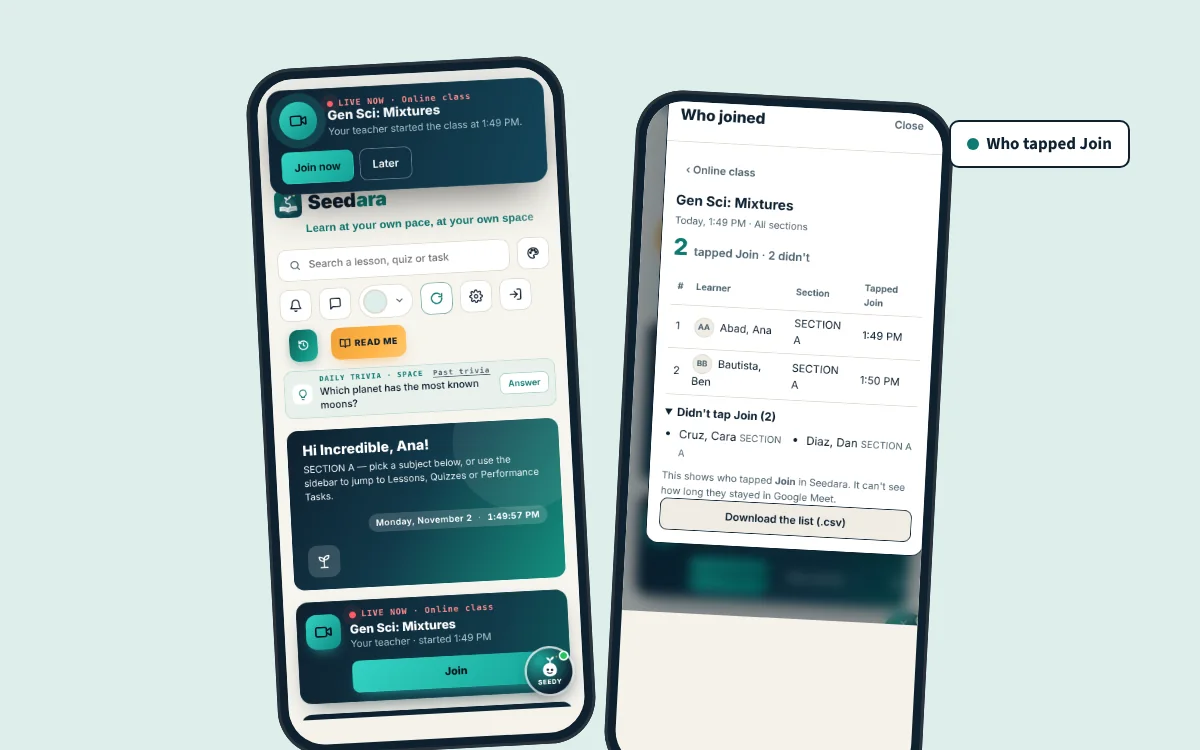
Online class on Google Meet
Paste your Google Meet link once. Then start a class, or schedule one, and Seedara tells your students.
A LIVE bar with Join, a Join now alert and a phone notification
Reminders and Add to calendar for scheduled classes
See who tapped Join, and download the list
NewPro and Deluxe
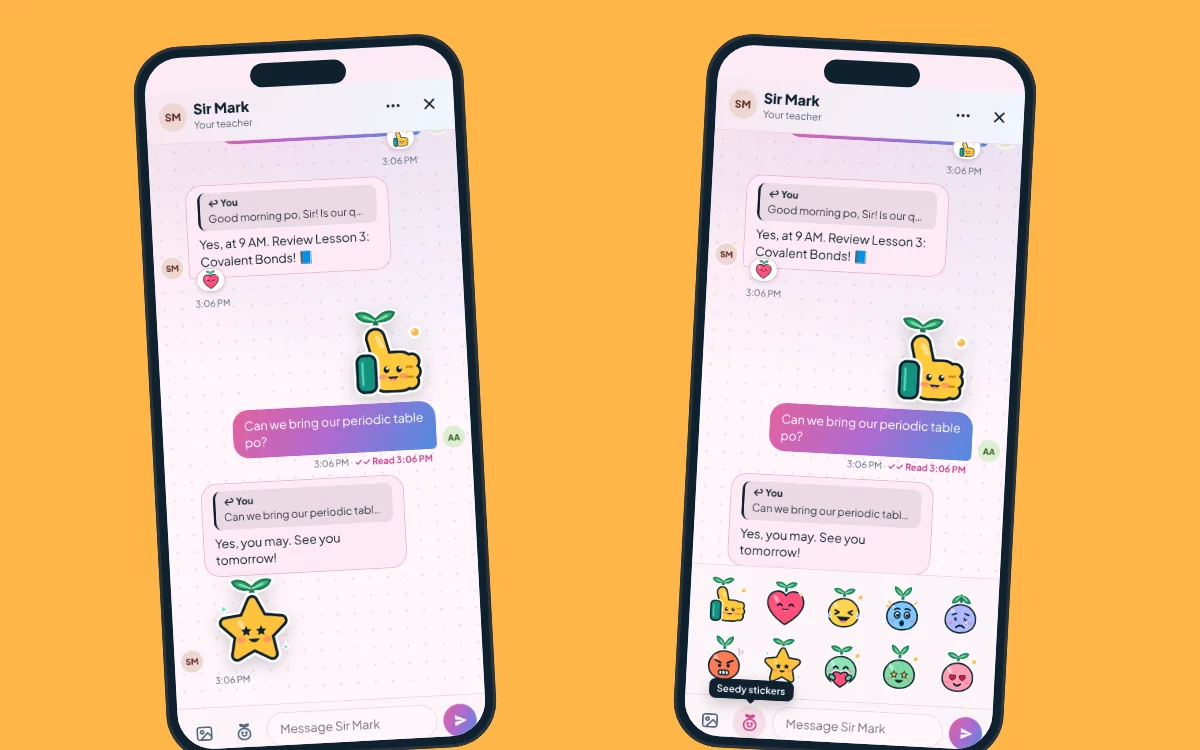
Messages with Seedy
Chat that feels like texting, with the little Seedara sprout, Seedy.
Reply to one message, so answers never get lost
Big Seedy stickers: like, heart, galing, hug and more
React with Seedy faces, in each student's own color theme
Everything in Seedara LMS
Lessons and files
Post lessons, handouts and links by subject and section. Students open them on their phones, anytime.
Quizzes and exams
Students answer on their phones, and their results come straight to you, ready to record.
Answer sheet scanner
Print bubble sheets, take a photo of each with your phone, and the scores are ready. Paste the answer key in one tap.
Class record
Written works, performance tasks and exams in one record, with DepEd's new grading. Students see their own scores.
Groups for each PT
Make different groups for every performance task, then score a whole group in one go.
Messages Pro and Deluxe
Text-style chat with your students: reply to a message, send Seedy stickers, or message a whole section at once.
Online class Pro and Deluxe
Hold your classes on Google Meet. Students get a LIVE bar with Join and a notification, and you see who joined.
Absence reports Pro and Deluxe
Students report an absence with photos of their excuse letter. You read it and answer from the app.
Phone notifications Pro and Deluxe
New lessons, announcements, "due tomorrow" and missing-work reminders reach students' phones.
Lesson plans and slides Deluxe, with AI
DepEd DLP and DLL, detailed, semi-detailed, 5E or your school's template, then classroom slides from the plan.
Also inside: flashcards, announcements and reminders, school links, color themes, your own site name and tab icon, and extras for science classes (simulations and daily science trivia). The AI builders on Deluxe use your own free Google Gemini key.
BCSeedara Planner and Seedara Exam Kit are included. Every Seedara LMS plan comes with both tools.
Be the teacher and the student for 2 minutes
Post a lesson, give a quiz and answer it on a student's phone, watch the grade compute itself, reply to a message, and make a lesson plan. No sign-up, sample class only.
How you get Seedara LMS
No coding. The setup guide walks you through every click.
Pay with your e-wallet
Scan the QR code in the order form and pay the exact amount.
GCashMayaMariBankGoTyme
Send your receipt
Upload a screenshot of the receipt with your name and email.
Get Seedara by email
Once your payment is confirmed, your Get my Seedara link and the step-by-step guide arrive in your inbox.
Set it up in about 30 minutes
It runs on your own Google account. Share the link with your students and you're live.
B
Seedara Planner
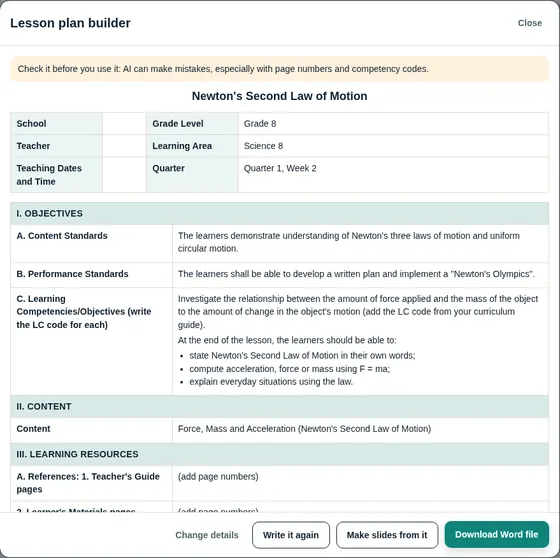
Lesson plans and slides in the format your school asks for
Type the topic, choose the format, and download the Word file. Then turn the plan into classroom slides.
Lesson plans
DepEd DLP and DLL
Detailed, semi-detailed and 5E
Your school's own Word template
A Word file you can still edit
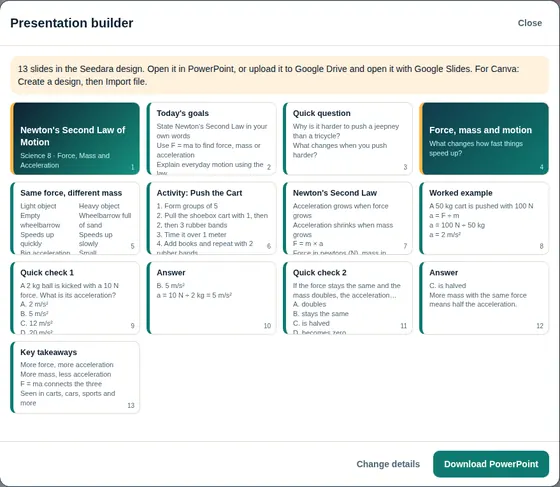
Slides
Made from your lesson plan
Quiz and answer slides, with speaker notes
A clean design, or your own template
Opens in PowerPoint, Google Slides or Canva
A DepEd lesson planReady to download as a Word file.Slides from the planQuiz and answer slides included.
C
Seedara Exam Kit
Make the test, print the sheets, check them with your phone
From the table of specifications to the item analysis, for every section you handle.
Plan the test with a TOS
Make the table of specifications for each test, by competency.
Print the answer sheets
Bubble sheets with each student's name, or unnamed sheets for the whole exam. One, two or four on a bond paper.
Check them with your phone
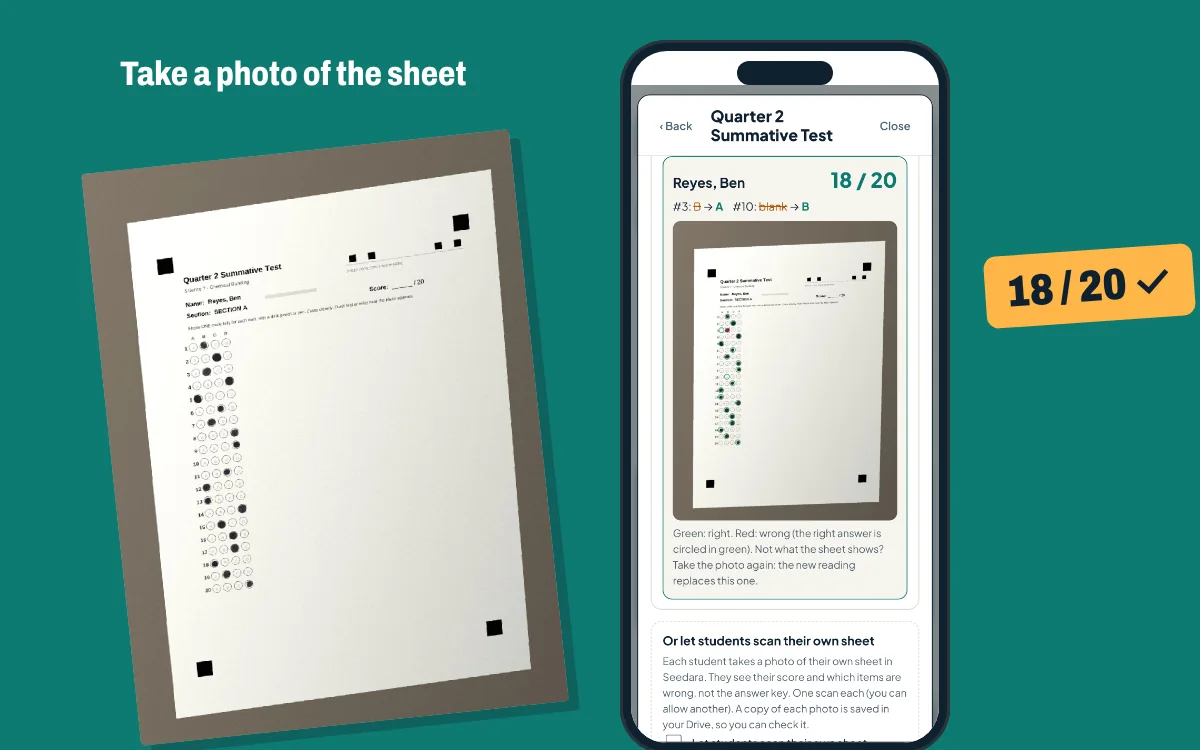
Take a photo of each sheet and the score shows right away. Students can scan their own sheet when you allow it.
See the MPS and item analysis
The mean percentage score of each section, and the items most students missed.
A sheet checked with a phone camera, with sample answers.
D
Seedara for Schools
One link and one PIN for the whole school
Students sign in once and see every subject from every teacher, each in its own tab. Paid once by the school.
One package, one payment
One link and one PIN for your whole school, and Deluxe for every teacher. Students sign in once and see every subject from every teacher, each in its own tab.
The school's own Seedara: sections, students with their LRN, teachers and who teaches what, and PIN slips to print
Deluxe for every teacher, each on their own Seedara: grades stay on the teacher's site
Seedara Planner and Seedara Exam Kit for every teacher
Free setup and 60 days of after-sales support
Paid once by the school. The school's Seedara runs on the registrar's or principal's Google account; each teacher uses their own.
Bigger school? Message us for a quote.
Welcome back! Choose a plan and order with the same email you used for your free trial. Your site turns back on with everything you made.
Prices
In Philippine pesos. Seedara LMS has no subscription and no hosting bills: it runs on your own Google account, and your students' work stays in your own Google Drive.
Seedara LMS
Pay once and it's yours, with Planner and Exam Kit included.
Buying for your teaching team?
One person pays for everyone. Each teacher gets their own Seedara and their own support.
Not sure yet? Try it free.
Every feature for 14 days, on your own Google account. No payment. When the trial ends, buy with the same email and everything you made stays.
Each license is for one teacher and one Google account. By ordering, you agree to the .
Already have Seedara? and pay only the difference.
Got a promo code? .
Orders are paused for now. Message us and we'll tell you when they open.
Planner and Exam Kit on their own
One-year passes. Both tools have a free monthly allowance.
Passes are paid online with GCash, Maya or card through PayMongo. A pass lasts one year from the day you pay and doesn't renew by itself. Seedara LMS plans and Seedara for Schools already include both tools.
Questions before you buy? Message us.
Got Pro or Deluxe? Book your free setup.
Pick a time that suits you. We'll set up Seedara with you on your own Google account, step by step, in about 45 minutes.
A registered Philippine business
Seedara is sold by SEEDARA LMS SOFTWARE PUBLISHING, a business name registered with the Department of Trade and Industry (DTI).
Business Name No. 8579964Valid until October 25, 2031
Yes. Start a free trial on this page: you get every feature for 14 days on your own Google account, no payment needed. When it ends, your site pauses (nothing is deleted). Buy a plan with the same email and it turns back on as it is.
What's the difference between Seedara LMS and the tools?
Seedara LMS is the complete class website on your own Google account: lessons, quizzes, the class record, messages and more, paid once. Seedara Planner and Seedara Exam Kit are single tools you can use on their own, with a free monthly allowance and a one-year pass when you need more. Every Seedara LMS plan and Seedara for Schools package includes both tools.
What can I do free with the Planner and the Exam Kit?
With the Planner: 3 lesson plans and 3 slide decks a month. With the Exam Kit: as many TOS and answer sheets as you need, and 50 scans a month. Need more? Get a one-year pass.
How do the one-year passes work?
Pay online with GCash, Maya or card through PayMongo, and your pass is linked to your email right away. It lasts one year from the day you pay, and nothing is charged again. Buy another pass anytime and it adds a year.
Does it follow the new DepEd grading?
Yes. The class record follows DepEd Order No. 015, s. 2026: three terms, Written/Oral Works 20%, Performance Tasks 50% and Examinations 30% for core subjects, and the new transmutation table. Quiz and exam scores go in as students finish, and the transmuted grade is computed for you.
Is this a subscription?
Seedara LMS isn't: you pay once and it's yours, with no monthly fees. The Exam Kit and Planner passes last a year and don't renew by themselves.
What do I need?
A Google account (a free Gmail works) and a computer for the first setup, which takes about 30 minutes. Your students only need a browser on a phone or computer.
Google warns that it "hasn't verified this app." Why?
That's expected. Your Seedara is your own private copy that runs in your own Google account, not a public app listed with Google, so Google shows this warning when you first set it up. Press Advanced, then Go to Seedara (unsafe). Your class records stay in your own Google Drive. If Google says This app is blocked, your school account (for example a DepEd account) doesn't allow apps like this: use your personal Gmail instead.
Where are my students' data kept?
In your own Google Drive. Seedara runs on your Google account, so the seller can't see your students, their work or their scores.
Do I pay for hosting?
No. Seedara runs on Google Apps Script, which is free with your Google account. Phone notifications use a small website on a free Cloudflare account; the guide shows you how.
Can I hold video classes in Seedara?
Yes, on Google Meet. Paste your Meet link in Online class, then start the class or schedule it. Students get a LIVE bar with Join, a phone notification and a reminder, and you see who tapped Join. Online class comes with Pro and Deluxe. With a free Gmail account, Google Meet ends calls of 3 or more people after 60 minutes.
How does the answer sheet scanner work?
Make an answer sheet in Seedara and type or paste the answer key. Print a bubble sheet for each student (their name is on it), then take a photo of each sheet with your phone. Seedara reads the answers, shows each score and the items to review, and can put the scores in your class record. You can also let students scan their own sheet.
What's the difference between the plans?
Every plan has the complete class website: lessons, quizzes, exams, performance tasks, flashcards, the class record and announcements. Pro adds messages with your students, online classes on Google Meet, phone notifications and absence reports. Deluxe also adds the AI Lesson Plan and Presentation builders, and future updates.
What does the license allow?
One license is for one teacher and one Google account, for your own classes. Sharing or reselling Seedara, or setting it up on more accounts than you paid for, isn't allowed. The full also appear in your Seedara the first time you sign in.
Can I upgrade later?
Yes, anytime. Use Upgrade your plan on this page (or the Upgrade button inside Seedara), pay only the difference, and the new features turn on by themselves. Nothing to reinstall, and your class data stays.
Are the AI tools free to use?
On Deluxe, the AI builders use your own free Google Gemini key, which takes about a minute to get. Google sets daily limits on free use.
How do I get Seedara after paying?
Upload your receipt in the order form. Once your payment is confirmed, your Get my Seedara link and the step-by-step guide arrive in your email.
What does after-sales support cover?
Help with setting up and using Seedara, for 30 days depending on your plan, counted from the day your order is confirmed.
What is free setup?
On Pro and Deluxe, we set up Seedara with you on your own Google account. After your order is confirmed, we'll message you to book a time.
Do I get future updates?
Deluxe includes future updates: we email you each new version. The other plans include the current version of Seedara.
Can our school buy for several teachers?
Yes. Choose how many teachers in the order form and list their emails. One person pays once, and each teacher gets their own Seedara and support.
Can our whole school use one link and one PIN?
Yes, with the Seedara for Schools package: one payment for the school's own Seedara and Deluxe for every teacher, by the size of your school. The registrar or principal runs the school's Seedara: it keeps the sections, students and teachers, and gives every student one PIN. Students open the school's link, type that PIN, and see every subject from every teacher. Each teacher uses their own Seedara, and their grades stay on their own site. Teachers you list when you order get their Seedara by email; the others set it up later with your order number.
Made in a real classroom. Seedara was built by Mark Alvin R. Duripa, LPT, a Filipino science teacher, for his own classes. It grew one feature at a time from what his students needed.
What students say
Shared with their permission by students who use Seedara in class.
Teaching tips in your inbox
Short, practical tips for running your class online, plus Seedara news. About twice a month. Unsubscribe anytime.